
Structured workflows for collaboration between users, contractors, and property managers.
PurposeProcesses enable structured, transparent collaboration around property-related events and actions — from problem reports to complex service workflows.
Processes are the core operational entities in facilioo. They represent structured workflows initiated and managed by property management companies, often in collaboration with users and contractors.
Each process is linked to a property management company (receiver Party), and can be associated with a specific Unit, one or more Users, and optionally one or more Contractors. This allows for precise context and role-based collaboration.
At the heart of every process is the Process Feed — a thread of messages, documents, and updates exchanged between involved stakeholders. Access and visibility are tightly controlled per participant, allowing for fine-grained communication and notification behaviour.
Processes are highly flexible and support different types (e.g., damage reports, renovation projects, maintenance coordination), each with its own behaviour and lifecycle.
Connected Parties and Accounts
To identify who is involved in a process, accounts are linked to the process. These accounts can belong to different parties, such as property management companies or users (e.g., tenants, owners, etc.). Currently, only a delete endpoint exists for managing these account–process associations in general, which are called responsible clerks.
Responsible clerks split up in two subgroups. Thereby, each linked account can act as an editor clerk or a spectator clerk, depending on its assigned role. Clerks can be added and updated via specific endpoints and deleted via the unified endpoint.
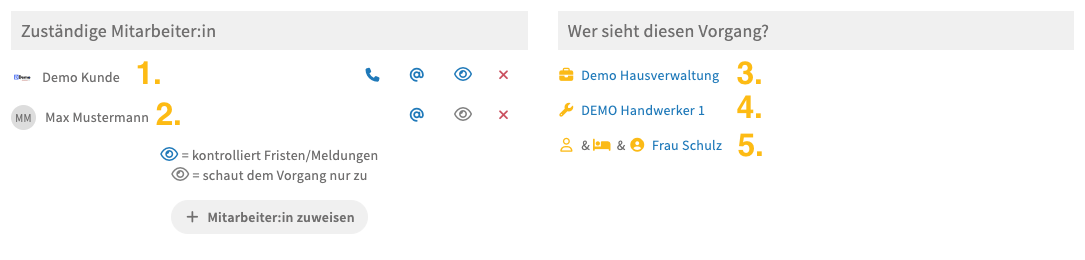
Process View in the Platform App, e.g., app.facilioo.de/orderGet.html?id=2222194
The view in the UI can be separated into two sections. On the left are Accounts of the currently logged-in Party that are either editor (1.) or spectator clerks (2.). On the right, there are just Parties that have any Account as editor or spectator clerk. This can happen through creating the Process (3.), being involved in a Work Order (4.), or being the Contact Party of the Process or a Process Feed being shared with the Party (5.).
Best PracticesNote that the editor and spectator clerks only contains accounts. There are basicly two use cases, how to use those.
1. Assigned Accounts of my PartyYou have to filter for your party id, to get employees of your party that are assigned to the process, by fetching either spectator or editor clerks. Or both, depending on your use case.
2. All Involved PartiesTo get the list of all parties involved in a process fetch all spectator and editor clerks, create a distinct list of all party ids of the retrieved accounts, and batch list them (GET /api/parties/batch).
Accessor Parties — "Wer sieht diesen Vorgang?"
Next to the individual clerks, a process keeps a list of the parties that can see it. This is the list the platform app renders as "Wer sieht diesen Vorgang?", and it is what you manage to bring another company — a contractor, an insurer, or a guest — into a process.
| Method | Endpoint | Description |
|---|---|---|
| GET | /api/processes/{id}/accessor-parties | Lists the parties that can see it. |
| PUT | /api/processes/{id}/accessor-parties/{partyId} | Grants a party access. |
| DELETE | /api/processes/{id}/accessor-parties/{partyId} | Revokes the access of a party. |
All three return the resulting list of accessor parties, so a client does not need a follow-up request.
Granting Access
PUT /api/processes/{id}/accessor-parties/{partyId} adds the party and, in the same step, links the accounts that represent it as clerks — a party only ever sees a process through its accounts. Which accounts represent a party depends on its type:
| Party type | Accounts that are linked |
|---|---|
Contractor, PoolManager | the supervisors of the party |
User (owner, tenant, etc.) | every active account of the party |
PropertyManagementCompany, Insurer, InsuranceBroker | the accounts assigned to the tenant the process belongs to |
Guest | the single account the guest was created for |
Accounts are only linked while the party is not represented on the process yet, so an already curated set of clerks is never overwritten. Use the editor and spectator clerk endpoints to adjust the individual accounts afterwards.
The party has to be related to youA party can only be granted access if it is already related to the calling party — for a property management company that means the contractor has to be in its address book. Adding an unrelated party responds with
404 Not Found, since the party is not visible to you in the first place. Create the relation first, then grant the access.
Revoking Access
DELETE /api/processes/{id}/accessor-parties/{partyId} removes the party, the clerks representing it, and its pending process notifications. The party that created the process cannot be removed and responds with 403 Forbidden.