
Delivering real-time updates to external systems through secure, customizable, and retry-capable HTTP callbacks.
PurposeWebhooks allow external systems to receive real-time updates when relevant events occur inside facilioo. This page outlines the core concepts, key entities, and known limitations of the current webhook system.
Concept
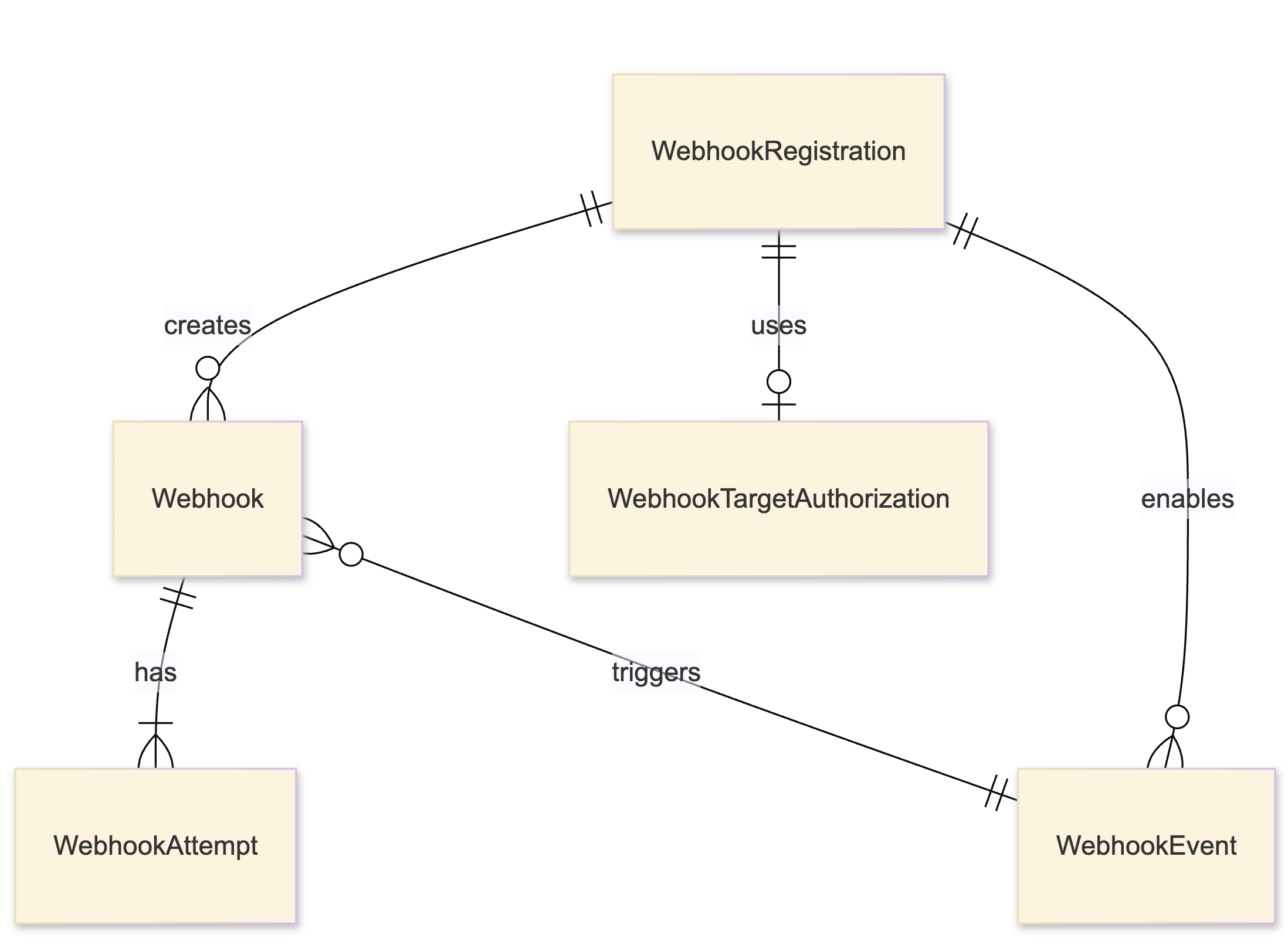
ER Diagram
Webhooks in facilioo are composed of several related entities working together to trigger and manage outgoing HTTP requests:
Configuration Entities
- WebhookRegistration: Defines the configuration for a webhook (target URL, events to subscribe to, grouping, and authorization).
Nested Configuration Entities
- WebhookTargetAuthorization: Stores the credentials or authentication details to be used when sending webhook requests for a particular
WebhookRegistration. - WebhookEvent: Represents a domain event that can be subscribed to via a
WebhookRegistration. It consists of an entity name (asProcess,Unit, etc.) and a type (see further below). AWebhookEventis individually created for each event attached in the creation of aWebhookRegistration.
Runtime Entities
- Webhook: An instance triggered by a
WebhookEvent, if the corresponding domain event happens. By being related to aWebhookEventthey are unique for eachWebhookRegistration. Furthermore, eachWebhookhas a state which can be one of the values further below. - WebhookAttempt: A record of each attempt to deliver a
Webhook, including retry logic and response handling.
Expected UsageThis documentation may appear more detailed than necessary — that’s because it includes insights into facilioo’s internal webhook handling. In most cases, you only need to create a WebhookRegistration (Recipe). This will automatically create:
WebhookRegistration,WebhookTargetAuthorization,- and one
WebhookEventper subscribed event.All other resources (
WebhookandWebhookAttempt) are runtime artifacts created by facilioo to manage the webhook lifecycle. You typically won’t interact with them unless something goes wrong — for debugging.Use the additional endpoints to diagnose delivery issues — for example, if your system doesn’t seem to receive a webhook call. There is no direct endpoint for WebhookTargetAuthorization, as it’s managed entirely through WebhookRegistration.
Enums
WebhookEventType
WebhookEventTypeThe type of WebhookEvent describes the kind of domain model change that triggers the event:
| ID | Type | Description |
|---|---|---|
1 | Created | A new entity was created in the system. |
2 | Updated | An existing entity was updated. |
3 | Deleted | An entity was deleted. |
4 | ReplaceRelation | Not supported yet! |
5 | AddToRelation | Not supported yet! |
6 | RemoveFromRelation | Not supported yet! |
WebhookState
WebhookStateThe state of a Webhook represents the current delivery state of an individual Webhook:
| ID | State | Description |
|---|---|---|
1 | Created | Webhook has been created but not yet delivered. |
2 | Retrying | Delivery has failed and is scheduled to be retried. |
3 | Successful | Webhook was delivered successfully (2xx status code). |
4 | Failed | All retry attempts have failed; Webhook is considered failed. |
5 | Aborted | Webhook was manually marked as aborted and will not be retried. |
6 | Pending | Webhook is waiting for grouping or scheduling. |
7 | Resolved | Webhook issue has been manually resolved. |
Example Instance
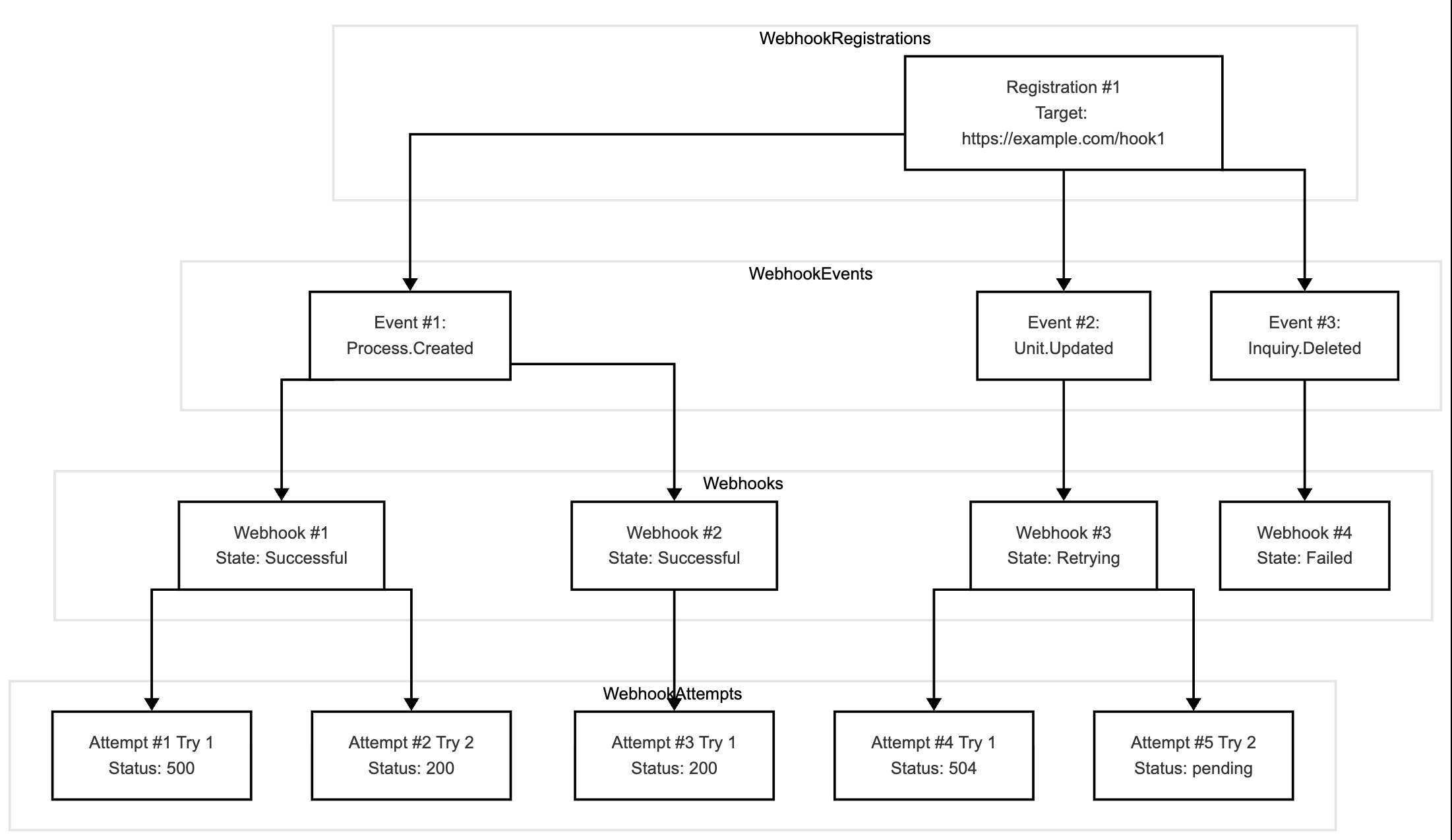
Example instance of a single, unauthorized WebhookRegistration with multiple WebhookEvents that are each triggered once and handled individually. The Webhook itself has also a reference to the WebhookRegistration that has been omitted in this diagram.
Lifecycle

Once per combination of events to subscribe to and target configuration:
- Register: Create a
WebhookRegistrationto specify the target URL and authorization, as well as which events to listen to. The creation of the Webhook Registration can be performed automated from within your system or manually via any HTTP-Client (like Postman or here).
Multiple instances based on the subscribed events from the registration and the actual events happening as trigger:
- Trigger: When the specified event occurs inside the facilioo system, a
Webhookentity is created. - Execute: The delivery of the
Webhookis scheduled and executed by an instance ofWebhookAttempt. If delivery fails, it is retried based on a predefined schedule. - Resolve: If delivery succeeds or is aborted/resolved manually, the Webhook is marked complete.
Authorization
WebhookTargetAuthorization supports the following:
| ID | Name | Description |
|---|---|---|
0 | No Auth | Assumes your endpoint is publicly available. |
1 | Basic Auth | The combination of username and password will be joined with a colon ( Structure: Example: |
2 | Platform signed Bearer Token in Header | Attaches a Bearer token to the request's Structure: Example: |
3 | Platform signed Bearer Token in Body | Attaches a Bearer token to the request's body as the attribute Structure: Example: |
4 | Target API Token | Attaches a provided access token to the Target API to the Structure: Example: |
Retry Mechanism
WebhookAttempts implement exponential back off retries:
| Attempt | Wait Time after previous fail |
|---|---|
| 1 (first) | scheduled instantly |
| 2 | 5 min |
| 3 | 15 min |
| 4 | 1 hour |
| 5 | 6 hours |
| 6 | 12 hours |
| 7 (last) | 24 hours |
Message Grouping
Webhooks can be delivered with grouping enabled. Grouping ensures that messages which belong together are processed in the correct order. When two or more messages are assigned to the same group:
- The delivery order is guaranteed within that group.
- A message in a group will only be delivered after all earlier messages in the same group have been successfully processed.
- Grouping is especially useful when entities have dependencies. For example:
- A Conference and its Topics
- A Property, its Entrances, and its Units
- ...
By default, a failed delivery blocks all subsequent messages in the same group until the failed message has been resolved. If you enable the option “Continue after fail”, message delivery within the group will proceed even if one message could not be delivered.
Webhook registrations provide two options to configure grouping behaviour:
ShouldGroup– If enabled, message grouping applies as described above.ShouldGroupContinueAfterFail– If enabled, subsequent messages in the group will still be attempted even if a prior message failed.
Registration
Hands OnThis is what's important, if you want to integrate facilioo's Webhooks into your system.
Refer to the Webhook Registration Recipe to create, trigger, and consume webhooks.
Altering aWebhookRegistrationCurrently, altering
targetAuthorizationorenabledEventsof aWebhookRegistrationisn't supported yet! If you need to change the used authorization for yourtargetUrlor if you want to create, update, or delete enabled events, you need to create a newWebhookRegistrationand delete the existing one.
Message Body
When a webhook is triggered, facilioo sends a POST request to the registered targetUrl. The JSON body always contains the following top-level fields:
| Field | Type | Description |
|---|---|---|
entity | object | The full serialized entity that triggered the event. The exact shape depends on the entity type (e.g. Inquiry, Property). |
event | object | Metadata about the event that triggered this webhook. |
event.type | int | The WebhookEventType — see Enums. |
event.entityName | string | The entity type name, e.g. "Inquiry" or "Property". |
initiatorPartyId | int | The ID of the party whose account triggered the action. |
initiatorAccountId | int | The ID of the account that triggered the action. |
Auth typePlatformSignedBearerTokenBodyIf the
WebhookRegistrationuses authorization type3(PlatformSignedBearerTokenBody), an additional top-level fieldplatformSignedBearerTokenis appended to the body.
Example: Inquiry Created
Inquiry Created{
"entity": {
"sourceId": 1,
"categoryId": 100,
"report": "<p>Heizungsausfall in der Wohnung gemeldet.</p>",
"subject": null,
"rejectionResponse": null,
"completionResponse": null,
"connectedPartyId": 1000001,
"creatorAccountId": 2001,
"creatorAccountRole": 7,
"receiverPartyId": 1000002,
"connectedPropertyId": null,
"connectedUnitId": null,
"associatedProcessId": null,
"associatedProcessFeedEntryId": null,
"associatedTodoId": null,
"priority": null,
"readStatus": 0,
"readByAccountId": null,
"dueDate": null,
"created": "2026-01-15T08:05:37.873Z",
"lastModified": null,
"deleted": null,
"id": 100001
},
"event": {
"type": 1,
"entityName": "Inquiry",
"created": null,
"lastModified": null,
"deleted": null,
"id": 0
},
"initiatorPartyId": 1000002,
"initiatorAccountId": 2001
}Supported Entities
Only the entities listed below can be used as entityName of a WebhookEvent.
Any other entity name is silently not working while creating a WebhookRegistration appears successful.
The columns Created, Updated and Deleted refer to the WebhookEventType of the same name:
- ✅ — the event is emitted for every supported way of changing the entity.
- ⚠️ — the event is emitted, but only through some of the possible ways of changing the entity (see note).
- ❌ — the event is never emitted, even though the entity name itself is valid.
Master Data
entityName | Created | Updated | Deleted | Note |
|---|---|---|---|---|
Party | ✅ | ✅ | ✅ | |
ContactDetails | ✅ | ✅ | ✅ | |
Property | ❌ | ✅ | ✅ | The Created event is not properly emitted for new properties yet. |
Entrance | ❌ | ✅ | ✅ | The Created event is not properly emitted for new entrances yet. |
Unit | ✅ | ✅ | ✅ | |
UnitContract | ✅ | ✅ | ✅ | |
Document | ✅ | ✅ | ✅ | |
File | ⚠️ | ⚠️ | ⚠️ | Only emitted for changes made through the API, not for those made on the facilioo platform UI. |
Operational Data
entityName | Created | Updated | Deleted | Note |
|---|---|---|---|---|
Process | ✅ | ✅ | ✅ | |
ProcessFeed | ✅ | ✅ | ⚠️ | The API offers no endpoint to delete a process feed entry. Deleted is therefore only emitted for deletions performed on the facilioo platform UI. |
WorkOrder | ✅ | ✅ | ✅ | |
Inquiry | ✅ | ✅ | ✅ | |
Notice | ⚠️ | ⚠️ | ⚠️ | Only emitted for changes made through the API, not for those made on the facilioo platform UI. |
Conferences
All conference entities require the conference feature to be enabled for your party. Conference data is managed through the API only, so every supported event is emitted for every way of changing it.
entityName | Created | Updated | Deleted | Note |
|---|---|---|---|---|
Conference | ✅ | ✅ | ✅ | |
Settings | ✅ | ✅ | ✅ | The conference settings of your party. |
Topic | ✅ | ✅ | ✅ | |
TopicNote | ✅ | ✅ | ✅ | |
Resolution | ✅ | ✅ | ✅ | |
ResolutionOption | ✅ | ✅ | ✅ | |
VotingSession | ✅ | ✅ | ✅ | |
Mandate | ✅ | ✅ | ✅ | |
ConferenceVote | ❌ | ✅ | ✅ | The Created event is not emitted for new votes yet. |
PredefinedVote | ❌ | ✅ | ✅ | The Created event is not emitted for new votes yet. |
ConferenceRole | ❌ | ❌ | ❌ | Conference roles can only be replaced as a whole list on a conference, which is a relation change. Relation events (WebhookEventType 4–6) are not supported yet. |
TopicTemplate | ✅ | ✅ | ✅ | |
ResolutionTemplate | ✅ | ✅ | ✅ | |
ResolutionOptionTemplate | ✅ | ✅ | ✅ |
Entities that are not listedEverything not in the tables above — most prominently
Account,Tenant,Offer,InvoiceandUserTask— cannot be subscribed to at all yet.
Known Issues
General
- Account Role Restriction: Currently, only accounts of a party with the type
PropertyManagementCompanyare allowed to use this feature. - No central overview: Clients cannot currently view or manage webhook registrations and their attempts in the UI of the facilioo platform.
- Staging: Webhooks are currently only supported in the production environment, not in staging.
Webhook Registration
- No validation: The system doesn't validate whether a target URL is reachable.
- No deduplication: Multiple identical registrations can be created.
- No clean-up: Registrations with persistent delivery failures are not removed automatically.
- Non-Altering: Enabled events and specified target authorization can not be altered. You have to create a new registration in order to change them.
- No filtering: You can not further specify conditions for a certain entity of an enabled event, like filters.
Webhook Invocation
- Event coverage incomplete: Not every entity can be subscribed to, and not every subscribable entity emits all three events. See Supported Entities for the complete list.
- Own Party Context: The webhook context is bound to your own party context. Therefore, only action triggered from an account in your party (usually a coworker at the property management company or yourself) will invoke a webhook. Because, tenants and owners are their own parties, their actions won't trigger a webhook. This is very crucial in terms of inquiries and process feeds, where it's very common that tenants and parties participate, but won't trigger a webhook.
- facilioo Platform (Web/App): Actions performed via the facilioo platform (web or app) might not be properly synced into the Webhook system, despite the targeted entity is supported in general (e.g., creating a
Documentin an existingProcesstriggers no Webhook, but creating aDocumentin an existingPropertytriggers a webhook, despite all three entities being supported in general in terms of webhooks). TheNotecolumn in Supported Entities marks the entities where this is known to be the case for all of their events. If you come across such a case, please don't hesitate to reach out to us. - Indirect actions: facilioo sometimes performs an action as a consequence of a completely different action or event — for example, a
Processthat is created automatically as a follow-up to something else. Such indirect changes do not always trigger a webhook. These cases are being reduced to a minimum and are not intended, but they can still occur in edge cases. If you notice a webhook that you expected but never received, please don't hesitate to reach out to us.
Recommendations
- Use
POST /api/webhook-registrations/searchand search bytargetUrlto find active registrations for particular endpoints. - Avoid long-living webhook registrations unless required. Consider implementing your own clean-up policy by tracking failed attempts.
- For debugging purposes of the webhook target and the HTTP-Request sent, you can use tools like PostBin or a local server with ngrok.